
How to Check Umami Analytics on Android
Published Sep 30, 2026 · 2 min read · Yichen Lab
SiteGlance is our app: a third-party Umami client made by Yichen Lab, not by Umami Software. It started on iPhone (here is that guide), and the Android version brings the same features to Android phones.
Connecting your Umami
- Self-hosted Umami: enter your instance address (HTTPS only) and sign in with your Umami username and password.
- Umami Cloud: create an API key in Umami Cloud and paste it in.
- No account yet: tap Explore demo to look around with three sample sites generated on the phone.
The two setups differ in how you sign in and what you need on the server side — self-hosted vs. Umami Cloud walks through both.
What you can read on the phone
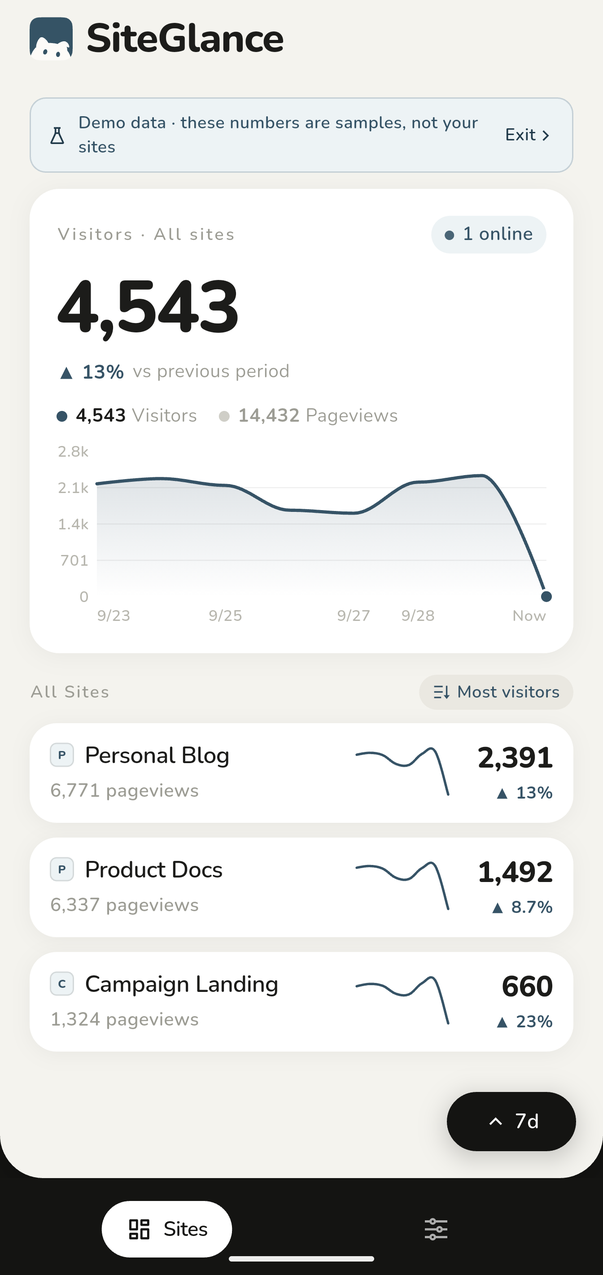
- All sites: visitors, pageviews, change and a trend line for each site, sortable by visitors, live, growth or name.
- Site detail: top pages, referrers, countries, devices and events for today, 24 hours, 7 days or 30 days.
- Goals and funnels you set up in Umami.
- Realtime: who is on your sites in the last five minutes.
Home screen widgets on Android
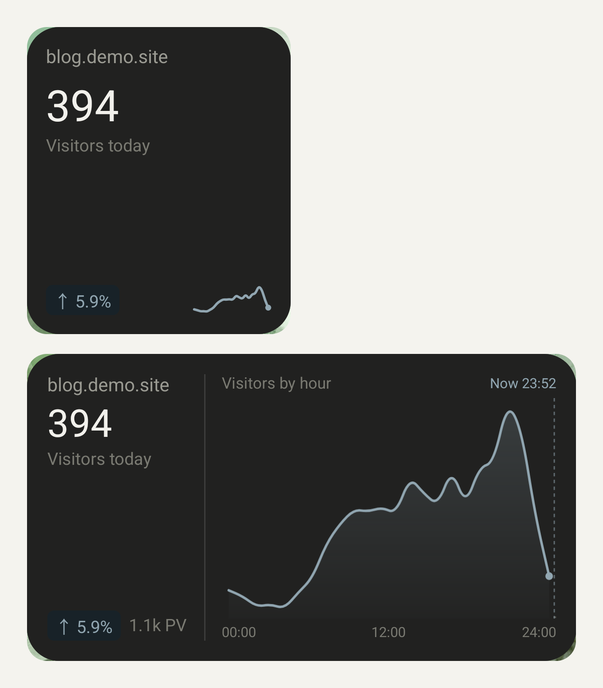
There are two free widgets: Visitors today (small) and Visitors by hour (medium, with a 24-hour wave and a marker for the current time). Each one follows a single site.
- Long-press an empty spot on your home screen and tap Widgets. Some launchers call it something else.
- Find SiteGlance and add the size you want.
- A new widget follows the first site of your current connection. To change it, long-press the widget and open its settings.
Widgets fetch fresh numbers from your Umami on their own about every 30 minutes — the shortest interval Android allows — and battery saving can stretch that. Opening the app syncs them right away. The iPhone widgets refresh on a different schedule; see the iPhone widget guide.
The demo reaches the home screen too
With the demo on, widgets show the sample sites, so you can see them before connecting anything. Exiting the demo clears them.
Where your data goes
Nowhere but your own Umami. SiteGlance has no server of its own and no tracking SDKs; the phone requests your stats directly. Your password or API key is encrypted with a key held in the Android Keystore, and the copy the widgets use stays in the app's private storage, excluded from cloud backups and device transfers.
Pro on Android
Free covers one connection, your first three sites and the top rows of every report. Pro is a one-time Google Play purchase that unlocks the rest. Restore it on any phone signed in with the same Google account; a purchase made on iPhone doesn't carry over to Android.
FAQ
- Does SiteGlance for Android work with self-hosted Umami?
- Yes, as long as your instance is served over HTTPS. Sign in with your Umami username and password.
- Are the Android widgets free?
- Yes. Both widget sizes are free.
- Can I move Pro from iPhone to Android?
- No. Pro is bought separately through the App Store and Google Play, and each purchase restores only on its own platform.
- Why does my widget show an older number?
- Android refreshes widgets about every 30 minutes at most, and battery saving can delay that. Open SiteGlance to sync right away.
Keep reading
- How to Check Umami Analytics on Your iPhoneThree ways to read your Umami stats on an iPhone — mobile Safari, a home screen bookmark, or a native app — and a step-by-step setup for SiteGlance.
- Add Umami Stats to Your iPhone Home Screen with WidgetsPut today's Umami visitors on your iPhone home screen. What the SiteGlance widgets show, how to add one, how to pick a site, and how often they refresh.